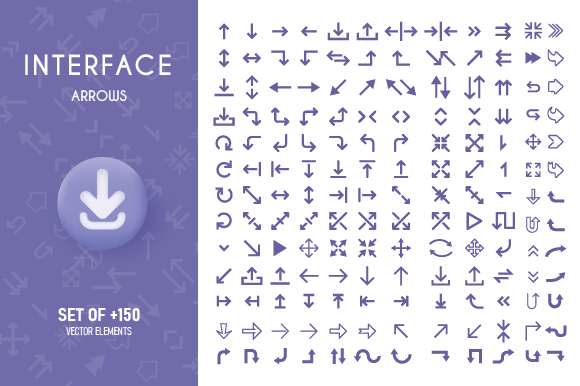
Ui Interface and Apps Arrow Collection: A Designer's Essential
Welcome to my store! I'm thrilled to introduce you to the "Ui Interface and Apps Arrow Collection," a versatile and high-quality set of arrow icons designed to enhance your digital projects. Whether you're a professional designer, a creative entrepreneur, or a hobbyist, this collection offers a range of features that can significantly improve the usability and appearance of your interfaces.
Key Features of the Ui Interface and Apps Arrow Collection
- High-Quality Files: The collection includes 01 JPEG, 01 PNG, 01 SVG, and 01 EPS files, all in high resolution (3600 X 3600) and 300 DPI, ensuring crisp and clear visuals.
- Vector Format: Every file is 100% vector, making it easy to resize without losing quality. This is particularly useful for creating scalable designs that look great on any device.
- CMYK Color Mode: All files are in CMYK color mode, which is ideal for both digital and print use, ensuring consistent and accurate color reproduction.
- Ease of Use: The collection is designed to be user-friendly, allowing for easy color changes and resizing. This saves time and money, as you won't need to hire a designer for simple adjustments.
Practical Applications Across Various Environments
The Ui Interface and Apps Arrow Collection is incredibly versatile and can be used in a wide range of personal, professional, educational, and commercial settings. Here are some practical applications:
Web Design and Development
In web design, these arrows can be used to create intuitive navigation systems. For example, you can use them to indicate the direction of scrolling, link to previous and next pages, or guide users through a multi-step process. The clean and simple design of the arrows enhances the overall user experience, making your website more engaging and user-friendly.
Mobile App Development
For mobile app developers, the Ui Interface and Apps Arrow Collection provides a set of icons that can be easily integrated into various app interfaces. These arrows can be used for back buttons, next steps in onboarding processes, and directional cues within the app. The high-resolution and vector format ensure that the icons look sharp and clear on any screen size.
Print and Digital Publications
Whether you're designing a brochure, a magazine, or an e-book, these arrows can add a professional touch to your layouts. They can be used to direct the reader's attention, highlight important information, or create a flow between different sections. The CMYK color mode ensures that the colors look consistent whether printed or viewed digitally.
Educational Materials
Educators and content creators can use these arrows to make learning materials more interactive and visually appealing. For instance, they can be used in presentations, infographics, and instructional videos to guide students through complex concepts or to show the sequence of steps in a process. The simplicity and clarity of the arrows make them perfect for educational purposes.
Potential Benefits and Real-World Examples
Using the Ui Interface and Apps Arrow Collection can bring several benefits to your projects:
- Enhanced User Experience: Clear and intuitive navigation elements improve the user experience, making your interface more user-friendly and accessible.
- Consistent Branding: High-quality, professionally designed icons help maintain a consistent and polished brand image across all your digital and print materials.
- Time and Cost Savings: The ease of use and flexibility of the collection mean you can quickly implement changes without the need for additional design work, saving both time and money.
- Versatility: The collection's versatility allows it to be used in a variety of contexts, from web and mobile apps to print and digital publications, making it a valuable asset for any designer's toolkit.
Practical Considerations for Using the Collection
When selecting and using the Ui Interface and Apps Arrow Collection, consider the following:
- Project Requirements: Determine the specific needs of your project. Are you looking for arrows for a web interface, a mobile app, or a print document? The collection's versatility makes it suitable for multiple uses, but it's essential to choose the right format and resolution for your specific application.
- Color and Style Consistency: Ensure that the arrows match the overall style and color scheme of your project. The collection's easy-to-use color change feature makes it simple to adapt the icons to your branding.
- Scalability and Resolution: Take advantage of the vector format to scale the icons to any size without losing quality. This is especially important for high-resolution screens and print materials where clarity is crucial.
- User Feedback: After implementing the arrows, gather feedback from users to see if the icons are effectively guiding their actions. Adjustments can be made easily to improve usability and user satisfaction.
Thank you for visiting PhoenixVectorArt. I hope the Ui Interface and Apps Arrow Collection becomes a valuable tool in your design arsenal. If you have any questions or need further assistance, feel free to reach out. Happy designing!